What counts as an abandoned cart in Shopify?
In this guide, an abandoned cart means a shopper who reached your checkout and left without paying. Shopify tells ChatFlows about a checkout as soon as the shopper starts it, not when they leave. So if your wait is very short, the reminder may arrive while the shopper is still typing their address.
Shoppers who add items to their cart but never start checkout are not covered. ChatFlows only sees checkouts that Shopify reports, along with the phone number the shopper entered.
What do you need before you start?
- Your Shopify store is connected to ChatFlows. This happens when you install the app.
- A WhatsApp number is connected to ChatFlows.
- Your Shopify checkout asks for a phone number.
- An approved WhatsApp template for each reminder. A template is a ready-made message that Meta checks and approves before you can send it. See WhatsApp message templates for Shopify.
- Shoppers have agreed to get messages from your business on WhatsApp. This is a WhatsApp rule, not a ChatFlows setting.
Which template category is a cart reminder?
The shopper has not messaged you, so your first message must be an approved template. Meta puts cart reminders in the Marketing category (based on Meta's template category guide, checked 17 November 2026).
- Meta charges for every Marketing message. ChatFlows adds nothing on top.
- If a customer replies STOP (or another unsubscribe word), they stop getting marketing messages from all your numbers.
- Marketing messages count toward your Meta messaging limit, so only send reminders where they are useful.
How do you set up a cart reminder?
Create an automation
An automation is a set of steps that ChatFlows runs by itself. Go to Automations and click Create Flow. Give it a name, choose your WhatsApp number in Channels, and save.
Choose when it sends
Click Start Trigger, the first box, which decides when the message is sent. Choose Shopify, then choose Cart abandoned as the event.
Choose the wait
In Send after (minutes), enter a number from 5 to 1,440 (1,440 minutes is 24 hours). If you leave it empty, ChatFlows waits 60 minutes.
Add the template
Add a WhatsApp Template step and choose your approved reminder template. To fill its blanks, such as the customer's name, type @ and pick a detail.
Add the cart link
Type @ and choose Cart Recovery Link in the template's button or text. It opens the checkout with the shopper's items still in the cart.
Save and turn it on
Save the automation and set it to Active. From then on, it runs for every new abandoned cart.
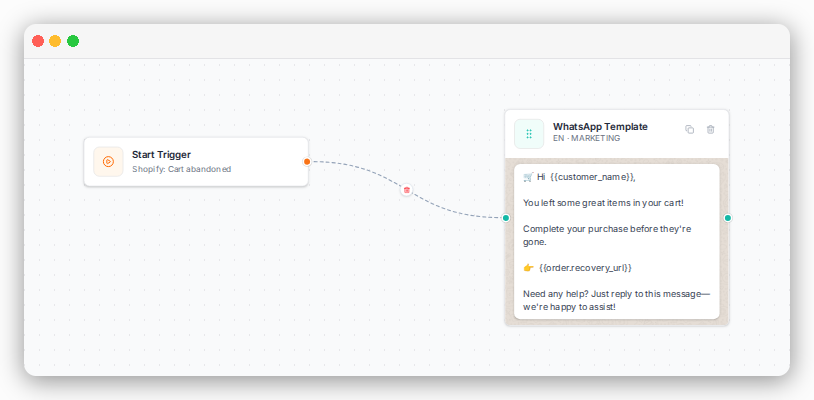
Want a faster start? The Flow Collection has a ready-made Shopify Cart Recovery flow. Click Use This and choose your number. Then check its wait time and template before you turn it on.
How long should you wait before sending a cart reminder?
| Wait time | What to expect |
|---|---|
| Less than 15 minutes | Usually too soon. The shopper may still be filling in the checkout form. |
| 30 to 60 minutes | Works well for most stores. 60 minutes is the default. |
| A few hours to 24 hours | Best for a second, later reminder. 24 hours (1,440 minutes) is the longest wait. |
When the wait ends, ChatFlows checks the checkout again. If the shopper has already paid, no message is sent. Each automation sends only one message per cart.
How do you send a second reminder without messaging shoppers who already paid?
Create a second Cart abandoned automation with a longer wait. For example, the first one sends a friendly reminder after 20 minutes, and the second sends a last reminder after 720 minutes (12 hours). If the shopper pays after the first reminder, the second one is not sent.
Meta charges for each reminder, so two reminders are usually enough.
What should a WhatsApp cart reminder say?
- Mention what they left behind, using the Items Summary field, so it is clear the message is about their cart.
- Give one clear action: a single Resume checkout button with the cart link.
- Keep it short and friendly, and invite them to reply. Replies arrive in your team inbox.
- Make sure the message still reads well if a field is empty. Empty details stay blank, and you cannot add other text to show instead.
For ready-to-copy reminder templates, see WhatsApp message templates for Shopify.
Can you include a discount code in a cart reminder?
Yes, but you write it in yourself. ChatFlows does not create discount codes. Create the code in Shopify first, then add it to your reminder template, for example "Use code WELCOME10 at checkout".
The Discount Code order field does not create a new offer. It only shows a code from the customer's most recent order or cart, if there is one.
How do you see how many carts you recovered?
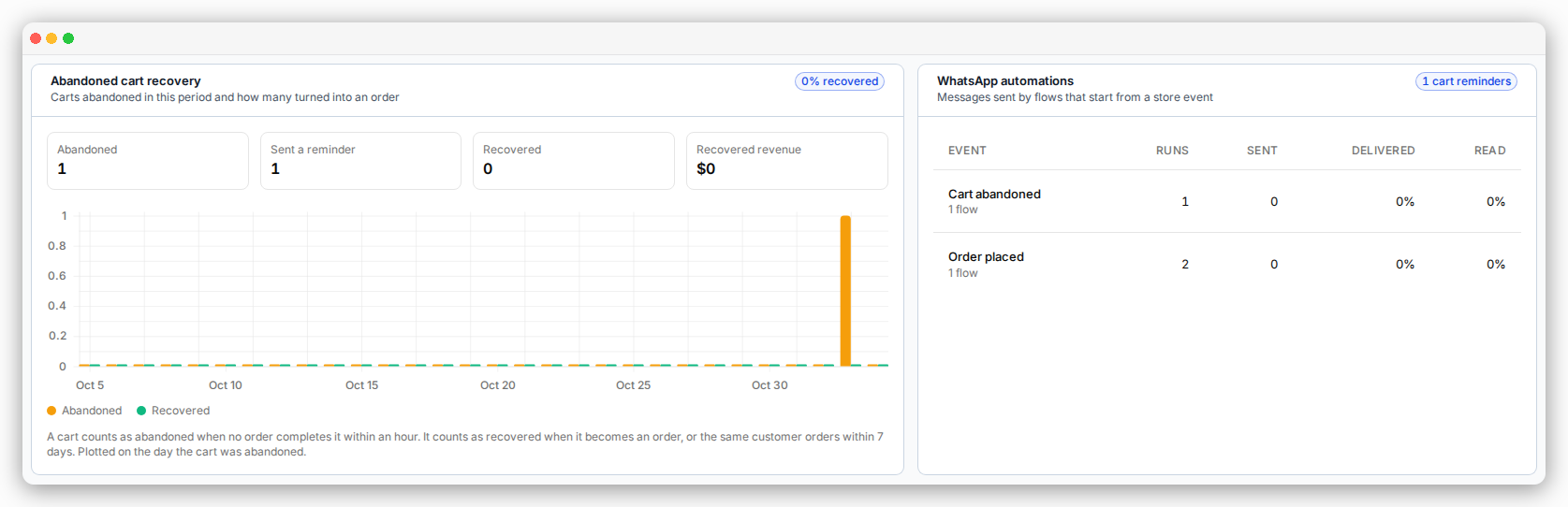
The Shopify section of your ChatFlows dashboard shows four numbers: Abandoned, Sent a reminder, Recovered and Recovered revenue.
- A cart counts as abandoned when an hour passes with no order. This is the same for every store, whatever wait you set for your reminder.
- A cart counts as recovered when the shopper pays for the same checkout, or the same customer places an order within 7 days, and the order is not cancelled.
Sources
- Meta: Template categorization, checked November 17, 2026
- Meta: WhatsApp Business Platform pricing, checked November 17, 2026